
The 70mai A800S is a high-resolution dashcam designed to capture clear road footage, offering 4K Ultra HD resolution, a wide field of view, Advanced Driver Assistance Systems (ADAS), and parking surveillance capabilities. For daily driving, these specifications mean you can record critical details like license plates and lane positions, providing essential evidence in the event of a road incident. However, getting the most out of these features requires understanding how they perform under real-world conditions, such as tropical downpours, intense heat, and complex local traffic.
Video Resolution and Field of View: Capturing the Road
The standout specification of the 70mai A800S is its 4K Ultra High Definition (UHD) resolution. In daily driving, this high pixel count is designed to deliver sharp image clarity, making it easier to read license plates, street signs, and vehicle decals even from a distance. During bright afternoons or under dim streetlights, the extra detail provided by 4K resolution can be the deciding factor when you need to verify the exact sequence of events during an incident.
Field of view (FOV) is another critical specification, determining how much of the road ahead the camera actually sees. A wide FOV allows the camera to capture multiple lanes of traffic, sidewalks, and merging vehicles. However, a very wide angle can sometimes introduce a “fisheye” effect, where the images at the far left and right edges appear distorted or curved. Balancing a wide view with minimal edge distortion is key to maintaining accurate spatial relationships in your footage.
Products mentioned in this guide

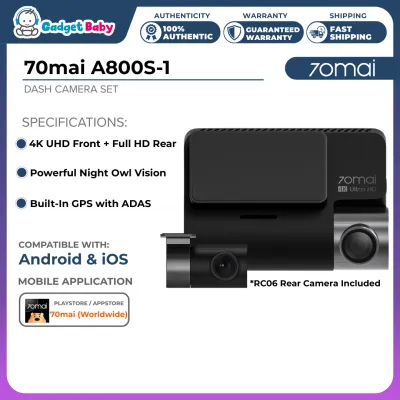
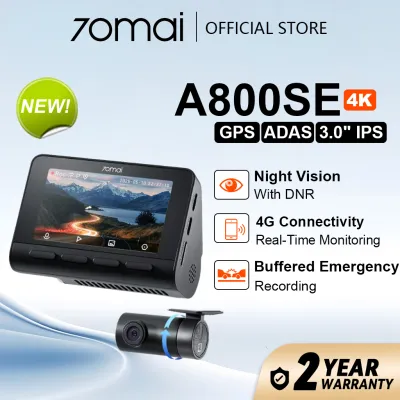
Prices are valid at publication and may change. Please refer to the product page for the latest price.
To evaluate how these specifications perform in your specific vehicle, it is highly recommended to review raw, uncompressed sample footage from the manufacturer or verified users. Keep in mind that real-world clarity is heavily influenced by external factors. For instance, heavy windshield tint can reduce the amount of light reaching the camera sensor at night, while poor wiper coverage during a sudden tropical downpour can blur the camera’s line of sight.
ADAS Capabilities: Realistic Expectations for Driver Alerts
The 70mai A800S features built-in Advanced Driver Assistance Systems (ADAS), which use the camera’s visual sensor to monitor the road and provide real-time alerts. Common camera-based ADAS functions include lane departure warnings, which alert you if the vehicle drifts out of its lane, and forward collision warnings, which detect if you are closing in too quickly on the vehicle ahead.

It is important to understand that these camera-based alerts differ significantly from the radar-based ADAS built directly into modern vehicles by car manufacturers. Radar-based systems use physical sensors to measure distance and speed with high precision, whereas camera-based systems rely entirely on visual processing. Because of this, the dashcam’s alerts are meant to serve as secondary notifications rather than active safety interventions.
In everyday driving, visual ADAS features face practical limitations. Faded or non-existent lane markings, heavy rain, glare from oncoming headlights, and highly congested or chaotic intersections can temporarily prevent the camera from accurately reading the road. To ensure these alerts function as intended, you should consult the official user manual to verify which specific alerts are supported and follow the exact calibration steps safely before relying on them on the road.
Parking Surveillance: Monitoring Your Vehicle Unattended
For many drivers, protecting their vehicle while it is parked is just as important as recording while driving. The 70mai A800S offers a parking surveillance mode designed to monitor your vehicle when the ignition is turned off. However, to enable this continuous monitoring, the dashcam cannot rely on its internal battery alone; it typically requires a separate hardwire kit connected directly to your vehicle’s fuse box.
This hardwire kit provides a constant power source from the car battery, allowing the camera to remain in a low-power standby state and wake up to record when it detects an impact or motion. To prevent this constant draw from draining your car’s battery to the point where the engine will not start, high-quality hardwire kits feature built-in low-voltage protection. This safety feature automatically cuts off power to the dashcam if the car battery’s voltage drops below a specific threshold.
Before setting up parking mode, assess your typical parking environments and determine if your vehicle’s electrical system is fully compatible. Some modern vehicles with complex electrical management systems may require specific installation steps to avoid triggering dashboard warning lights. Verifying these requirements beforehand ensures your vehicle remains protected without compromising battery health.
Storage and App Connectivity: Managing Your Recordings
Recording in high-resolution 4K generates a massive amount of data, which places a heavy demand on your storage media. To ensure reliable operation, it is crucial to use high-endurance microSD cards specifically rated for continuous write cycles. Standard memory cards used in smartphones or cameras often fail quickly under the constant stress of dashcam recording, which can lead to corrupted files or missed footage when you need it most.
The dashcam manages storage space through a process called loop recording. This feature automatically overwrites the oldest unprotected video files with new footage once the memory card reaches its capacity. In the event of a sudden stop or collision, the built-in G-sensor is designed to automatically lock the current recording segment, saving it to a separate folder where it cannot be overwritten by the loop system.
To view or download these files, the 70mai A800S features built-in Wi-Fi that connects directly to a companion app on your smartphone. While this wireless connection makes it convenient to adjust settings and preview clips on the go, downloading large 4K video files over Wi-Fi can take several minutes. For transferring multiple large files or long trips, removing the microSD card and using a card reader on a computer is often a faster alternative.
Installation and Power Setup: Ensuring Safe Operation
When installing the 70mai A800S, you generally have two primary power setup options. The simplest method is using the included cigarette lighter adapter, which plugs directly into your car’s 12V accessory outlet. While this plug-and-play setup is incredibly easy to install and remove, it typically cuts power as soon as you turn off the engine, meaning you will not be able to use the continuous parking surveillance features.
The alternative is hardwiring the dashcam directly to the vehicle’s fuse box. This method provides a cleaner, hidden look with no exposed wires hanging down the dashboard, and it enables the full suite of parking mode features. Regardless of which method you choose, it is critical to route the power cables safely behind the interior trim panels, ensuring they do not obstruct the deployment paths of side-curtain airbags, interfere with the steering column, or get tangled near the foot pedals.
Because hardwiring involves tapping directly into your car’s electrical system, improper installation can lead to blown fuses, electrical shorts, or even voided vehicle warranties. If you are not comfortable working with automotive fuses and wiring, it is highly recommended to have the installation performed by a qualified automotive electrician. A professional can ensure the connections are secure, properly fused, and safely integrated into your vehicle’s existing electrical architecture.
Frequently Asked Questions (FAQ)
Does the 70mai A800S record audio inside the cabin?
Yes, the 70mai A800S is equipped with a built-in microphone that allows it to record audio inside the cabin alongside the video footage. If you prefer privacy or wish to comply with local passenger consent guidelines, you can easily enable or disable audio recording through the device’s system settings menu or via the companion smartphone app. The microphone is designed to capture clear cabin conversations and immediate external sounds, such as horns or impact noises.
How does extreme heat affect the dashcam's operation?
Operating a dashcam in hot, tropical climates requires careful attention to thermal limits. The 70mai A800S is built to withstand typical automotive temperatures, but prolonged exposure to direct, magnified sunlight through a windshield can cause heat to build up rapidly inside the cabin. To protect the internal components, ensure the dashcam is mounted in a position that does not block your vehicle’s air conditioning vents, and check the manufacturer’s specified operating temperature range in the user manual to avoid overheating during long parking sessions in the sun.
Community discussion
Share your experience or ask a question. Comments are reviewed before publication.