
Selecting the ideal Botslab dash cam requires aligning the device’s technical capabilities with your specific driving patterns, road conditions, and security priorities. Whether you navigate congested urban streets, travel long provincial highways at night, or operate a commercial ride-hailing vehicle, different models offer tailored features to meet these demands. Identifying your primary driving profile ensures you invest in a camera that provides clear, actionable evidence when you need it most.
In the Philippines, diverse road environments present unique challenges, from the bumper-to-bumper traffic of major metropolitan avenues to poorly lit rural roads prone to sudden hazards. A dash cam serves as an essential tool for insurance claims, resolving traffic disputes, and providing peace of mind. By evaluating key specifications such as video resolution, night vision performance, and power management, you can select a model that integrates seamlessly with your vehicle and driving routine.
How to Match Your Driving Habits to a Dash Cam
Your daily driving environment is the most important factor when choosing a dash cam. Drivers who spend most of their time in dense, slow-moving city traffic face different risks than those who travel long distances at high speeds. Understanding these distinct scenarios helps narrow down the features that will protect you most effectively on the road.
Products mentioned in this guide
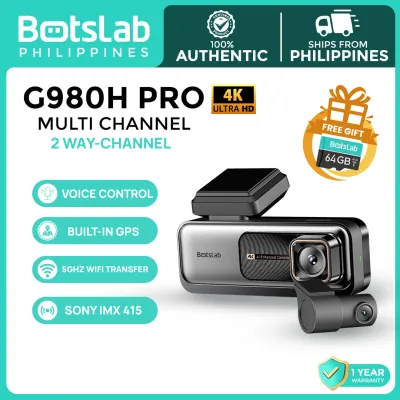
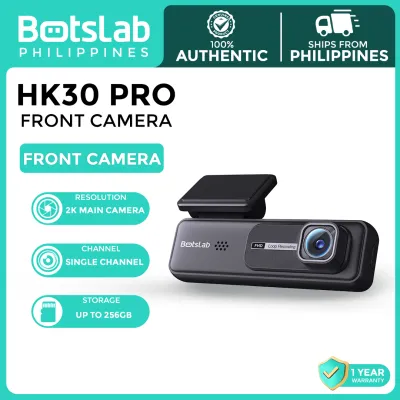
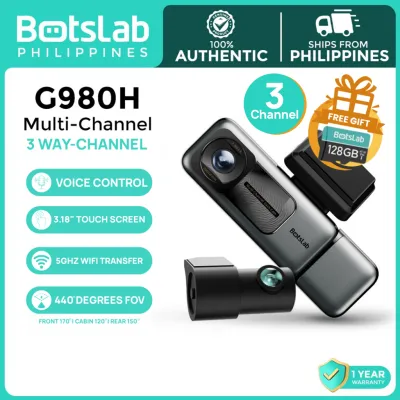
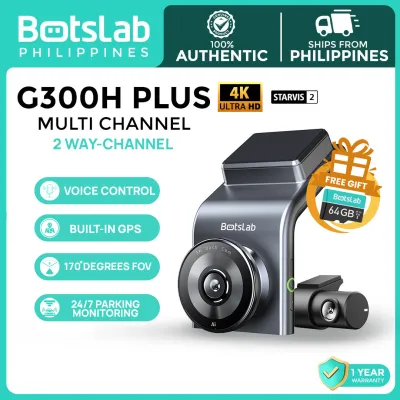
Prices are valid at publication and may change. Please refer to the product page for the latest price.
- The Daily City Commuter: This profile represents drivers who navigate heavy urban traffic, face tight parking spots in commercial areas, and deal with frequent minor scrapes or disputes. The primary needs for this group are a compact camera design that does not obstruct forward vision, reliable loop recording, and a highly responsive G-sensor to automatically save footage of sudden stops or parking lot bumps.
- The Long-Distance Provincial Traveler: This profile includes drivers who frequently use major expressways and travel to provinces, often driving late into the night on unlit roads. Key requirements include high-resolution video (such as 2K or 4K) to capture legible license plates at high speeds, advanced low-light performance, built-in GPS for speed and route logging, and dual-channel (front and rear) coverage to monitor tailgating vehicles.
- The Ride-Hailing or Taxi Driver: Operating a commercial transport vehicle means managing risks both outside and inside the cabin. Drivers for transport network vehicle services (TNVS) require multi-channel systems that record the road ahead while simultaneously capturing interior cabin activity. Infrared night vision is critical for clear passenger area monitoring in the dark, and an easily accessible audio mute toggle helps respect passenger privacy when required.
- The Weekend Family Driver: For those who use their vehicle primarily for family outings, school runs, and weekend trips, ease of use is paramount. This profile benefits from straightforward smartphone app integration for quick video retrieval, reliable parking surveillance to protect the vehicle in crowded mall parking lots, and low-maintenance operation.
To help identify your primary requirements, consider this quick checklist before selecting a model:
- Do you regularly drive after dark on roads without streetlights?
- Do you park your vehicle in unsecured, high-traffic public areas?
- Are you legally required or personally motivated to document passenger behavior inside your vehicle?
- Do you require immediate access to video files on your smartphone to show traffic enforcers or insurance adjusters?
Essential Botslab Dash Cam Features to Compare
Evaluating technical specifications prevents purchasing an underpowered device or overpaying for unnecessary features. When comparing models within the Botslab lineup, focus on how specific hardware and software features translate to real-world utility on the road.

Video resolution directly dictates the level of detail captured in your footage. While 1080p (Full HD) is the standard baseline for capturing general traffic flow, upgrading to 2K (1440p) or 4K (2160p) significantly improves your ability to read license plates, street signs, and facial features from a distance. High-resolution sensors allow you to crop or zoom into a recorded video frame during an investigation without turning the image into a pixelated blur.
Night vision capability is equally critical, especially on dark provincial roads. Look for cameras equipped with Wide Dynamic Range (WDR) or High Dynamic Range (HDR) technologies. These systems balance extreme light contrasts, such as bright oncoming headlights against a pitch-black background, preventing the camera sensor from becoming blinded or producing washed-out images. High-quality image sensors with wide apertures (such as f/1.8 or f/1.5) allow more light to reach the sensor, preserving color and detail in low-light conditions.
The lens field of view (FOV) determines how much of the road ahead is captured. A wider FOV (around 140 to 170 degrees) covers more lanes of traffic and side streets, which is useful for documenting side-impact collisions. However, extremely wide angles can introduce fish-eye distortion at the edges of the frame, making vehicles appear further away than they actually are. A field of view between 130 and 150 degrees generally offers the best balance between wide coverage and minimal edge distortion.
Connectivity features simplify how you interact with your saved files. Built-in Wi-Fi allows the dash cam to pair directly with the Botslab mobile application on your smartphone. This connection enables you to view live feeds, adjust camera settings, and download video clips directly to your phone’s storage without removing the microSD card. High-speed 5GHz Wi-Fi support is highly beneficial for transferring large 4K video files quickly compared to standard 2.4GHz connections.
Finally, always verify local warranty coverage and official support channels before making a purchase. Buying through authorized local retailers ensures that you receive genuine products compatible with local power standards, alongside access to customer service and replacement parts if a component fails.
Best Botslab Models for Daily City Commuting
For drivers navigating daily city traffic, the ideal dash cam is compact, reliable, and unobtrusive. The Botslab G300H is a highly practical choice for urban commuters. It features a unique, wedge-shaped design that mounts flush against the windshield, allowing it to hide neatly behind the rearview mirror. This low-profile form factor ensures your forward line of sight remains completely unobstructed, which is crucial for safety and compliance with local traffic regulations.
The G300H records in 1296p high-definition resolution, providing a clear step up from standard 1080p cameras. It features a 160-degree wide-angle lens that easily captures multi-lane city streets, ensuring that vehicles merging suddenly from adjacent lanes are documented. With its built-in G-sensor, the camera detects sudden braking, sharp turns, or physical impacts, automatically locking the current video segment to prevent it from being overwritten by the continuous loop recording system.
Another excellent entry-level option for city driving is the Botslab C211. This model offers a highly minimalist design and records in clear 1080p resolution. It is designed for straightforward plug-and-play operation, making it an excellent choice for budget-conscious drivers who want basic, reliable front-facing protection without complex setup procedures.
While these commuter-focused models excel at documenting active driving scenarios, they have limitations regarding stationary vehicle protection. Standard installations powered by a cigarette lighter adapter will turn off when the vehicle’s engine is shut down. To enable 24-hour parking surveillance on these models, you must purchase and install an official Botslab hardwire kit, which connects the camera directly to your vehicle’s fuse box to draw continuous power safely.
Best Botslab Models for Long-Distance and Night Driving
High-speed highway travel and nocturnal provincial trips demand superior image clarity and comprehensive vehicle coverage. The flagship Botslab G900 is engineered specifically for these demanding conditions. It features a high-performance front camera that records in true 4K resolution, paired with a 1080p rear camera to provide complete dual-channel coverage of the road ahead and behind.
The G900 utilizes advanced night vision sensors and HDR technology to deliver exceptional clarity in low-light environments. This setup ensures that license plates remain legible even when traveling at high speeds on unlit highways or under the glare of high-beam headlights. The dual-channel configuration is particularly valuable on expressways, where rear-end collisions and tailgating incidents are common hazards.
For a highly capable mid-range alternative, the Botslab G500H offers a dual-channel configuration featuring a 2K front camera and a 1080p rear camera. This model provides an excellent balance of resolution and storage efficiency, capturing crisp details of road signs and license plates without generating the massive file sizes associated with 4K recording.
Both the G900 and G500H feature built-in GPS logging. This technology embeds real-time speed, direction, and geographical coordinates directly into the video file metadata. In the event of an incident on a remote highway, this tracking data provides crucial, verifiable proof of your exact location and driving speed.
Because high-resolution dual-channel recording generates large volumes of data, these models must be paired with high-endurance microSD cards. Standard memory cards are not designed to handle the constant, high-speed write cycles required by 2K and 4K video streams, which can lead to file corruption and recording failures. Always select a card rated Class 10, U3, or V30 that is explicitly marketed for continuous security camera or dash cam use.
Best Botslab Models for Ride-Hailing and Cabin Monitoring
Commercial drivers and ride-hailing operators face unique security challenges that extend inside the vehicle cabin. Documenting passenger behavior, verifying interior events, and having clear audio-visual records can protect drivers from false claims, passenger disputes, and security threats. For these applications, a multi-channel setup configured for cabin monitoring is essential.
While Botslab offers dual-channel models like the G900 and G500H, these systems can be adapted for interior monitoring by mounting the secondary camera on the front windshield facing backward into the cabin, rather than on the rear window. This configuration allows the primary high-resolution camera to record the road ahead while the secondary camera captures everything happening inside the passenger compartment.
When recording the vehicle interior, infrared (IR) capability is highly beneficial. Standard cameras struggle to capture usable footage inside a dark cabin at night, often producing dark, silhouette-only images. If your primary driving hours are during the evening or night shifts, verify if your chosen configuration can be paired with an IR-enabled secondary lens, which uses invisible infrared light to illuminate the cabin in clear black-and-white without distracting the driver.
Operating an interior-facing camera requires careful attention to privacy regulations. In the Philippines, the Data Privacy Act of 2012 governs the collection of personal audio and video data. To remain compliant and maintain professional standards, always observe the following practices:
- Display Clear Signage: Place visible stickers on the vehicle's windows or dashboard informing passengers that active video and audio recording are in progress for safety purposes.
- Manage Audio Recording: The Botslab mobile application allows you to toggle audio recording on or off. If a passenger requests privacy for a sensitive conversation, you can quickly mute the microphone via the app or camera settings.
- Secure Your Data: Ensure that access to the dash cam's memory card is physically secure, and do not share recorded passenger footage publicly unless required by law enforcement or official platform dispute resolution processes.
Installation, Power Options, and Automotive Safety Checks
Proper installation and power management are critical to ensuring your dash cam operates reliably without damaging your vehicle’s electrical system or compromising passenger safety.
There are two primary methods for powering a dash cam, each with distinct trade-offs:
- Cigarette Lighter Adapter: This is the simplest, non-invasive installation method. You plug the power adapter directly into the vehicle's 12V accessory socket and route the cable along the headliner and passenger-side A-pillar. The camera turns on and off automatically with the vehicle's ignition. The main disadvantages are that it leaves the 12V socket occupied, exposes visible wiring, and disables parking surveillance modes once the engine is turned off.
- Hardwire Kit: This method connects the dash cam directly to the vehicle's fuse box using an official Botslab hardwiring cable. It hides all wiring behind the dashboard, frees up your 12V socket, and enables continuous parking surveillance by drawing power directly from the car battery when the engine is off.
While hardwiring enables valuable security features, it introduces the risk of battery drain. Although official Botslab hardwire kits feature built-in low-voltage cutoff protection—which automatically disconnects power to the camera if the car battery drops below a set threshold—frequent parking recording can still accelerate wear on an older battery. Regularly check your vehicle’s battery health, particularly in hot tropical climates where high ambient temperatures naturally shorten automotive battery lifespans.
Before attempting any electrical modifications, consult your vehicle’s owner’s manual and fuse box diagram to identify safe, non-critical circuits for tapping (such as the accessory socket or dome light fuse). Never tap into critical safety systems such as those powering airbags, anti-lock brakes (ABS), or engine control units. If you are unfamiliar with automotive electrical systems, strongly consider hiring a qualified professional installer to complete the hardwiring process to avoid voiding your vehicle’s warranty or causing electrical shorts.
When mounting your dash cam, position the unit on the windshield directly behind or adjacent to the rearview mirror. This placement ensures the lens has a clear, centered view of the road while remaining hidden from your direct line of sight. Under local road safety regulations, including the Anti-Distracted Driving Act, electronic devices must not be installed within the driver’s direct field of view or interfere with safe vehicle operation.
Finally, check the product label for the manufacturer’s specified operating temperature range. Dash cams mounted to windshields are subjected to extreme greenhouse heat when parked under direct sunlight. To protect the internal battery or supercapacitor and prevent thermal shutdown, practice physical heat mitigation. Park in shaded areas whenever possible, use reflective front windshield sunshades, and ensure the camera’s ventilation slots are kept clear of dust and debris.
Frequently Asked Questions (FAQ)
How do Botslab dash cams handle high cabin temperatures?
Botslab dash cams are constructed using heat-resistant materials designed to withstand standard automotive environments. However, parking a vehicle under direct tropical sunlight can cause cabin temperatures to rise significantly beyond ambient levels. To prevent thermal damage or temporary shutdowns, verify the exact operating limits on your model’s product label. You can protect your device by using reflective windshield sunshades when parked, parking in covered structures, or leaving your vehicle’s windows cracked slightly to promote airflow if it is safe to do so.
What type of microSD card is required for continuous recording?
Dash cams subject memory cards to continuous, high-speed write-and-overwrite cycles, which will quickly cause standard consumer-grade microSD cards to fail. For reliable operation, you must use a High Endurance microSD card rated Class 10, U3, or V30. These specialized cards are engineered specifically for the constant demands of security and automotive cameras. Always consult your specific Botslab model’s user manual to verify the maximum supported storage capacity, which typically ranges from 128GB to 256GB.
Can I mix a Botslab front camera with a third-party rear camera?
No, mixing a Botslab front camera with a rear camera from a different manufacturer is not supported. Dash cam systems rely on proprietary hardware connections, specific pin configurations, and matching firmware to process dual-channel video feeds simultaneously. Attempting to connect a third-party rear camera can cause firmware errors, prevent recording, or physically damage the ports on your devices. For guaranteed compatibility and optimal performance, always purchase official Botslab dual-camera bundles or authorized brand-specific accessories.
Community discussion
Share your experience or ask a question. Comments are reviewed before publication.