
Choosing the right navigation tool for a long drive across provincial highways can make the difference between a smooth journey and getting lost in areas with zero cellular reception. The ideal choice between a dedicated car GPS navigation device and a smartphone application depends on whether you prioritize guaranteed offline routing in remote provinces or the everyday convenience of a multi-use device. For drivers planning long highway and provincial trips across the Philippines, navigating unfamiliar roads requires a system that remains reliable under challenging conditions. This comparison evaluates both options across three decision-defining dimensions: screen visibility in intense tropical sunlight, offline map reliability in areas with weak signal coverage, and power management during hours of continuous operation. By understanding how these factors impact your drive, you can select a setup that keeps you on the correct path without compromising safety or convenience.
Hardware, Mounting, and Dashboard Setup
The physical installation of your navigation system directly impacts both driving safety and ergonomics. Dedicated car GPS navigation devices are engineered specifically for dashboard integration, typically shipping with heavy-duty suction mounts designed to withstand the vibrations of uneven provincial roads. These mounts often feature mechanical locking levers that secure the device to the windshield or dashboard, keeping the screen stable even when driving over potholes or unpaved terrain. The physical chassis of a dedicated unit is also built to tolerate prolonged exposure to cabin heat, with mounting brackets that allow for precise angle adjustments to keep the screen within your natural line of sight.
Smartphones, by contrast, rely on aftermarket mounting solutions that vary widely in quality and stability. While magnetic mounts and air vent clips offer convenience, they may not provide the stability required for long-distance driving. Air vent clips can restrict airflow from your vehicle’s air conditioning system, while magnetic mounts require attaching a metal plate to your phone or case, which can interfere with wireless charging. Furthermore, heavy smartphones can cause weak mounts to sag or detach entirely when subjected to sudden stops or rough road surfaces, creating a dangerous distraction.
Products mentioned in this guide
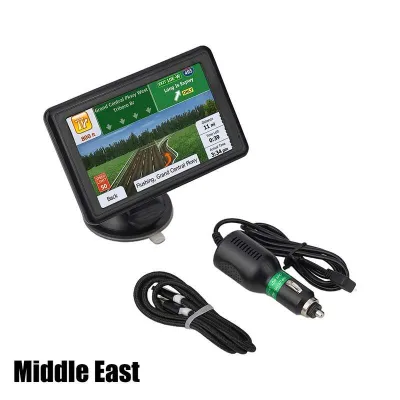
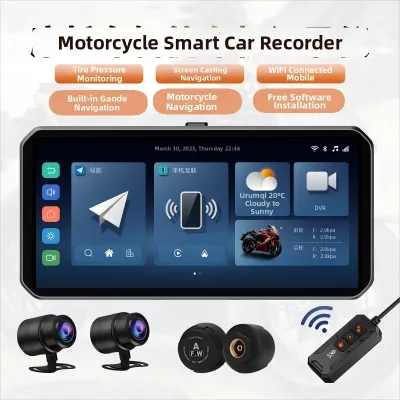
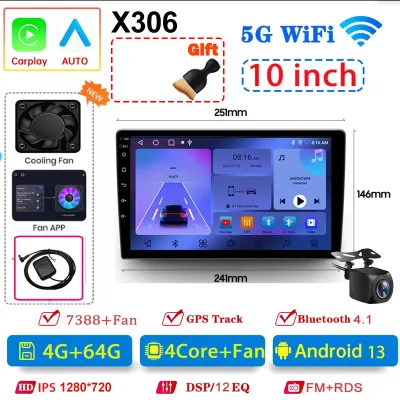
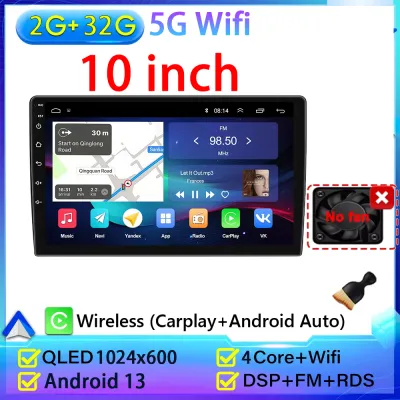
Prices are valid at publication and may change. Please refer to the product page for the latest price.
Ergonomics play a vital role when you need to interact with your navigation system while stationary. Dedicated GPS units feature user interfaces designed specifically for in-car use, utilizing large touch targets, simplified menus, and high-contrast graphics that are easy to read and tap. Smartphones, while boasting highly responsive capacitive touchscreens, often feature smaller icons and complex menus that require precise finger placement. This high-density layout can make simple tasks, such as zooming in on a map or canceling a route, more difficult to perform safely.
Before purchasing any navigation setup, you must verify mount stability, dashboard space, and windshield legality. In the Philippines, road safety regulations dictate that any device mounted on the windshield or dashboard must not obstruct the driver’s direct view of the road. To ensure compliance and maintain optimal safety, position your device in a location that allows you to check directions with a quick glance while keeping your primary focus on the road ahead.
Screen Visibility in Tropical Sunlight
Driving under the intense tropical sun presents a significant challenge for screen legibility. Dedicated car GPS navigation devices are typically manufactured with specialized matte, anti-glare screen coatings. These coatings diffuse incoming sunlight rather than reflecting it directly back into your eyes, allowing the map to remain visible even when the sun is shining directly onto the dashboard. Additionally, the display technology used in these units is optimized for high-contrast rendering of roads and text, ensuring that you can discern route details without squinting.

Smartphones generally feature glossy glass displays designed to deliver vibrant colors and deep blacks in indoor environments. While these screens look excellent in low-light conditions, they act like mirrors under direct sunlight, producing harsh reflections that can obscure map details. To compensate for this glare, drivers often have to increase their phone’s screen brightness to its maximum level. This action not only accelerates battery drain but also generates substantial internal heat, which can lead to performance issues.
When evaluating your options, check the manufacturer specifications of any device you plan to use. Look for screen brightness ratings measured in nits, as well as explicit “matte finish” or “anti-reflective” labels on the product packaging. A screen with a higher nit rating will perform significantly better in bright daylight, reducing eye strain during long daytime drives.
Polarized sunglasses, which are commonly worn to reduce road glare, can also affect how you view your navigation screen. The polarizing filters in sunglasses can interact with the polarizing layers of electronic displays, sometimes causing the screen to appear dark, distorted, or completely black at certain viewing angles. Dedicated automotive GPS screens are often engineered to mitigate this effect, ensuring the display remains legible through polarized lenses. Smartphone screens, however, can vary widely in their compatibility with polarized sunglasses, sometimes requiring you to tilt your head or adjust the mounting angle of the phone to see the map clearly.
Offline Maps and Provincial Signal Reliability
Once you leave major urban centers, cellular signal strength can become highly unpredictable. Mountainous terrains, dense forest canopies, and remote coastal roads often suffer from weak or non-existent mobile data coverage. Dedicated car GPS navigation devices address this issue by storing complete, highly detailed map databases directly on their internal memory or an external SD card. Because these units connect directly to global satellite networks rather than cellular towers, they can pinpoint your location and provide continuous turn-by-turn guidance anywhere under an open sky, completely independent of mobile network availability.
Smartphones can also provide offline navigation, but this capability requires proactive preparation. You must manually download the specific provincial maps of your destination and transit routes while connected to a stable Wi-Fi network before starting your trip. If you neglect to download a specific region, or if road closures force you to detour into an adjacent province that you did not download, your smartphone app may fail to render the map or calculate a new route, leaving you without guidance in an unfamiliar area.
Rerouting behavior in dead zones highlights another key difference between the two systems. When you miss a turn in an area with no cellular signal, a dedicated GPS unit uses its local database to recalculate your route instantly. A smartphone app without pre-downloaded offline data for that specific location will be unable to calculate a new path, often displaying connection error messages until you drive back into cellular range. This delay can lead to navigation errors and unnecessary detours on unfamiliar provincial roads.
While smartphones excel at providing real-time traffic updates and dynamic rerouting in urban areas with active data connections, these features disappear when cellular service is lost. Drivers planning trips to remote regions must verify map update frequencies and provincial road coverage for the specific areas they intend to visit. Ensuring that your chosen device has access to up-to-date road databases is essential for navigating newly constructed highways and bypass roads safely.
Battery Drain, Heat, and Power Management
Continuous navigation is one of the most resource-intensive tasks a mobile device can perform. Running the GPS hardware, keeping the screen illuminated at maximum brightness, and processing continuous location data generates substantial heat and demands a constant supply of power. Dedicated car GPS navigation devices are designed from the ground up for continuous external power. They run directly off your vehicle’s electrical system via a cigarette lighter adapter or a hardwired connection, meaning they do not rely on a sensitive internal lithium-ion battery for long-term operation. This design makes them highly resilient to the high temperatures that can build up on a vehicle’s dashboard.
Smartphones face severe thermal challenges when used for continuous navigation on the dashboard. A phone mounted near the windshield is exposed to direct solar radiation, which is compounded by the internal heat generated by the active GPS chip, cellular modem, and continuous charging process. When a smartphone’s internal temperature rises too high, its safety mechanisms will trigger thermal throttling. This process automatically dims the screen to reduce heat, slows down processing speed, or shuts down the device entirely to protect the battery from permanent damage. A sudden screen shutdown while navigating a complex highway junction can create a highly stressful and potentially unsafe situation.
To prevent power issues during your trip, you must check your vehicle’s USB output or cigarette lighter adapter specifications. Many built-in vehicle USB ports, particularly in older models, only output 0.5 amperes of current. This low output is often insufficient to keep up with the power demands of a smartphone running a navigation app, resulting in a net battery drain even while plugged in. Using a high-quality cigarette lighter adapter that delivers adequate power, such as 2.4 amperes or support for modern fast-charging protocols, is essential to ensure your device remains fully charged throughout your journey.
Additionally, leaving a smartphone in a parked car under the sun can expose it to extreme temperatures that can degrade battery health or cause the battery to swell. Dedicated GPS units are built with industrial-grade components that tolerate these temperature fluctuations much better, though it is always advisable to remove any valuable electronic device from plain sight when parking your vehicle.
Decision Framework: Choosing Your Navigation Setup
To help you select the most reliable navigation setup for your driving needs, use this structured decision framework to evaluate your typical travel routes and vehicle capabilities.
Choose a dedicated car gps navigation device if:
- You frequently travel through remote provinces with unreliable or non-existent cellular coverage.
- You prefer a single-purpose device that does not interrupt your navigation with incoming phone calls, text messages, or app notifications.
- You require a highly durable screen with a matte, anti-glare coating that remains legible under direct, intense tropical sunlight.
Choose a smartphone if:
- Your road trips are primarily limited to major highways and urban corridors where cellular networks are stable and reliable.
- You rely heavily on real-time traffic data, crowd-sourced road hazard alerts, and instant rerouting to avoid city congestion.
- You prefer to avoid the upfront cost of purchasing separate hardware and the ongoing task of manually updating a standalone map database.
Verify first if:
- Your vehicle's power outlets can deliver sufficient amperage to keep your smartphone charged while running intensive navigation apps.
- Your chosen phone mount is robust enough to secure your device on rough provincial roads without blocking your view of the road.
- Your smartphone can operate continuously under direct sunlight without triggering thermal shutdowns or screen dimming.
| Verification Point | Dedicated GPS Device | Smartphone Setup |
|---|---|---|
| Primary Power Source | Vehicle electrical system (highly heat-resistant) | Internal battery (prone to thermal throttling under sun) |
| Offline Map Storage | Preloaded on internal memory or SD card | Requires manual pre-downloading per region |
| Screen Coating | Matte, anti-glare finish | Glossy, highly reflective glass |
| Signal Dependency | Direct satellite connection (no cellular needed) | Cellular network dependent for real-time updates |
Frequently Asked Questions (FAQ)
Can I use my phone's GPS without a data connection?
Yes, the physical GPS receiver inside your smartphone operates independently of cellular data or Wi-Fi networks, allowing it to calculate your coordinates using satellite signals anywhere on Earth. However, the navigation app requires map data to display your position and calculate routes. Without a cellular connection, the app cannot download these maps on the fly. To use your phone’s GPS offline, you must download the specific provincial maps of your destination and transit routes while you still have a stable Wi-Fi connection before departing.
Do dedicated GPS units require a monthly subscription?
Most dedicated car GPS navigation devices do not require a monthly subscription fee for basic routing and satellite connectivity, as the GPS signal itself is free to access globally. However, you should check the manufacturer’s policy regarding map updates, as some older or budget models may charge a fee for downloading updated road databases, while others include lifetime map updates. Additionally, premium features such as live traffic alerts, weather updates, or speed camera warnings may require a separate subscription or a Bluetooth link to your smartphone’s cellular data connection.
Community discussion
Share your experience or ask a question. Comments are reviewed before publication.