
To achieve a reliable smartphone streaming experience in your vehicle, look for a car stereo that features at least Bluetooth 5.0 and a dedicated high-amperage USB data port. While older Bluetooth versions can stream music, newer generations offer the connection stability and power efficiency required to prevent audio dropouts, especially in dense urban areas or during long drives. Additionally, verifying the supported audio codecs and understanding the difference between charging and data-transfer USB ports will ensure your phone stays charged and your music plays without interruption.
Upgrading your vehicle’s head unit is one of the most effective ways to modernize your daily commute. By focusing on a few key wireless and wired standards, you can avoid compatibility issues and select a system that integrates seamlessly with your mobile devices.
Understanding Bluetooth Versions and Audio Codecs
When evaluating a new car stereo, the Bluetooth generation listed on the box is your first indicator of wireless performance. Bluetooth 5.0 and newer versions offer significant improvements over legacy standards like Bluetooth 4.0, particularly in terms of signal range, connection stability, and power efficiency. In the tropical heat of the Philippines, where devices can run warm during long drives, the improved power efficiency of newer Bluetooth versions helps reduce battery drain and thermal stress on your smartphone. You should check the manufacturer’s specifications to verify the exact Bluetooth version supported by the head unit.
Products mentioned in this guide
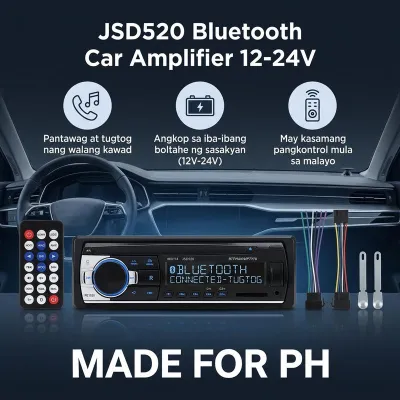
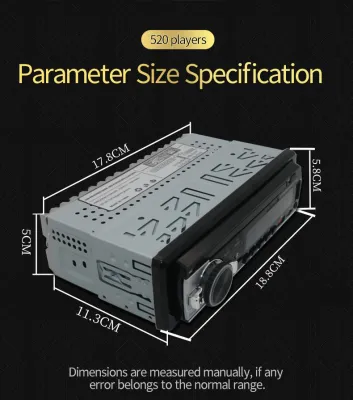
1,023 Lazada user ratings
Quality:Quality at maganda naman siya sana magtagal po . marami salamat po sa rider na lagi nagdedeliver ng parcel ko . at thank you din sa …Read full reviewShow less
Quality:Quality at maganda naman siya sana magtagal po . marami salamat po sa rider na lagi nagdedeliver ng parcel ko . at thank you din sa seller pero sana po may bubblerap man lang po sana yung items para makasafe lang din po .
Quality:good quality. Appearance:excellent. Performance:working excellent. Hindi ko nakuhanan ng picture kanina pagkatapos kung nainstall. M…Read full reviewShow less
Quality:good quality. Appearance:excellent. Performance:working excellent. Hindi ko nakuhanan ng picture kanina pagkatapos kung nainstall. Maganda yung sound, satisfied si tomer. Thanks seller.
Quality:Excellent Appearance:Elegant Performance:Good thanks for fast delivery, and it's working Properly sound loud and Clear, maraming sal…Read full reviewShow less
Quality:Excellent Appearance:Elegant Performance:Good thanks for fast delivery, and it's working Properly sound loud and Clear, maraming salamat po
thanks serrel ok naman sya salamt order ulet ako para sa kapatid ko 👌Ease of Use:ok 🔌Connectivity:ok 🔌Compatibility:ok picture not related
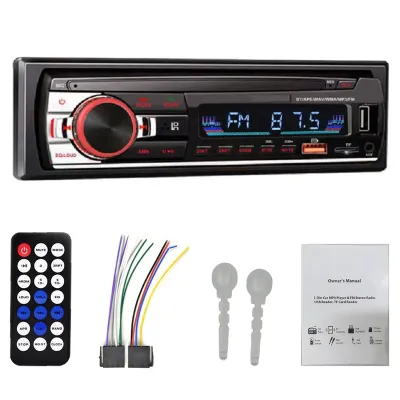
1,005 Lazada user ratings
gumagana,USB ok,fm,ok,kung gagamit ng equilizer kailangan lang n adapter..remote,low bat battery,pinalitan ok gumagana...kinabit ko sa RAV4.…Read full reviewShow less
gumagana,USB ok,fm,ok,kung gagamit ng equilizer kailangan lang n adapter..remote,low bat battery,pinalitan ok gumagana...kinabit ko sa RAV4.2001 model
Multiple color options available., Sleek and stylish design., Easy to install and use., Allows hands-free calling for safer driving.,
Easy to install and use., Supports various audio formats for versatile playback., Allows hands-free calling for safer driving.,
Easy to install and use., package received in good packaging condition and thank you seller for very fast delivery
very good malakas din ang sound at maganda very easy to install and to operate , best buy 😍
Prices are valid at publication and may change. Please refer to the product page for the latest price.
Beyond the version number, specific Bluetooth profiles dictate how your phone interacts with the stereo. The Advanced Audio Distribution Profile (A2DP) is the essential standard for streaming high-quality stereo audio wirelessly. To control your music directly from the dashboard or steering wheel buttons, the stereo must also support the Audio/Video Remote Control Profile (AVRCP). Verifying that both profiles are supported ensures you can skip tracks, pause, and view song metadata without touching your phone.
Audio codecs are another critical factor that directly impacts sound quality. Codecs compress and decompress audio data for wireless transmission, and both your phone and the car stereo must support the same codec to use it. While the Subband Codec (SBC) is the universal baseline supported by all Bluetooth audio devices, it often compresses audio heavily. If you use an Apple device, look for Advanced Audio Coding (AAC) support; for Android devices, check for aptX or LDAC compatibility on the stereo’s product label or manual to ensure compatibility.
Choosing the Right USB Ports for Your Needs
Wired connections remain vital for charging your phone and accessing advanced smartphone integration features. However, not all USB ports on a car stereo serve the same purpose. Many budget-friendly head units feature USB ports designed solely for charging, which cannot transfer data or run smartphone integration software. You must distinguish between these charge-only ports and dedicated data-transfer ports, which are required for wired audio playback, system firmware updates, and screen mirroring.

The physical connector type also requires careful consideration. While older USB-A ports are still common, newer car stereos increasingly feature USB-C ports to match modern smartphone cables. Using high-quality, certified cables is essential for maintaining a stable connection, as cheap or damaged cables can cause frequent disconnections when driving over uneven road surfaces. Always check the product packaging to ensure the physical port matches your existing cables or plan to purchase a compatible, high-quality replacement.
Charging speed is another common pain point during long road trips or heavy traffic delays. Many older or lower-end car stereos only output 0.5 amperes of current, which is barely enough to keep a modern smartphone from losing power while running navigation apps. To ensure your device actually charges while streaming, look for a stereo that specifies a high-amperage output, such as 1.5 amperes or 2.1 amperes. Checking these power delivery ratings in the manual before buying will prevent the frustration of a slowly draining battery.
Matching Stereo Specs to Your Smartphone and Usage
To get the most out of your new car stereo, you must align its specifications with your specific smartphone ecosystem. If you rely heavily on mobile apps for navigation and communication, verify that the head unit officially supports integration protocols like Apple CarPlay or Android Auto. These platforms require specific hardware and software compatibility, so you should cross-reference the stereo’s supported operating system versions with your current phone before making a decision.
Choosing between a wired and wireless setup involves weighing convenience against stability. Wireless connections offer the ultimate convenience for short trips, allowing your phone to stay in your pocket while automatically connecting to the dashboard. However, wireless data transmission consumes more phone battery and can occasionally suffer from interference in high-traffic areas. A wired USB connection provides maximum stability for high-resolution audio streaming and demanding navigation apps while simultaneously keeping your device fully charged.
Your daily driving habits should ultimately dictate which connectivity features you prioritize. If your commute consists of short city trips, a stereo with fast Bluetooth pairing and robust AVRCP controls might be your primary focus. For those who frequently embark on long provincial drives, prioritizing high-amperage USB charging and wired smartphone integration will provide a more reliable and functional setup. Identifying your primary use case helps you allocate your budget to the features that matter most.
Pre-Purchase Compatibility and Installation Checks
Before purchasing a new car stereo, you must verify that it physically and electrically fits your vehicle. Car stereos generally follow standard single-DIN or double-DIN sizes, but dashboard configurations vary widely by vehicle make and model. You will need to purchase a vehicle-specific dash kit and a compatible wiring harness to connect the new head unit to your car’s electrical system without cutting factory wires. Always verify these dimensions and interface requirements using your vehicle’s documentation.
Integrating the new stereo with your vehicle’s existing factory features requires careful planning. If your car has steering wheel controls, a factory backup camera, or an active factory amplifier system, you will likely need additional integration modules to retain these functions. Consult your vehicle’s owner manual and the stereo’s installation guide to identify any necessary adapters. Failing to check these compatibility requirements beforehand can lead to lost functionality or unexpected installation costs.
Working with automotive electrical systems carries inherent risks of short circuits, blown fuses, or damage to sensitive vehicle electronics. Always disconnect the vehicle’s negative battery terminal before beginning any electrical work. If the stereo’s wiring diagram conflicts with your vehicle’s factory wiring, or if the installation requires structural modifications to the dashboard, stop immediately. In these situations, consulting a qualified car audio professional is the safest way to ensure a secure, road-legal, and reliable installation.
Frequently Asked Questions (FAQ)
Can I use a Bluetooth adapter if my car stereo lacks built-in Bluetooth?
Yes, you can use an auxiliary or USB-powered Bluetooth receiver to add wireless streaming to an older car stereo. These adapters plug into your vehicle’s auxiliary input port or an FM transmitter frequency to play audio from your phone. However, they generally offer lower audio quality and do not support steering wheel control integration, meaning you must still use your phone to change tracks.
Does a newer Bluetooth version guarantee better sound quality?
A newer Bluetooth version does not automatically guarantee better sound quality, as it primarily improves connection stability, range, and power efficiency. Actual audio fidelity is determined by the audio codecs supported by both your phone and the stereo, as well as the quality of your source files and speakers. To improve sound quality, ensure both devices support advanced codecs like AAC or aptX.
Will my phone charge faster if I use a data-transfer USB port instead of a charge-only port?
Not necessarily. Charging speed is determined by the port’s power output rating, measured in amperes or watts, rather than its data capabilities. A charge-only port with a high power rating will charge your phone faster than a data-transfer port with a low power rating. Always check the specific amperage listed in the stereo’s manual to verify charging capabilities.
Community discussion
Share your experience or ask a question. Comments are reviewed before publication.