
Choosing the right front and back dash camera system in the Philippines requires balancing high-temperature durability, clear video resolution, and reliable power management. Dual-channel setups capture both forward-facing traffic and rear-end incidents, providing comprehensive protection on busy roads. With unpredictable traffic patterns, heavy congestion, and varying road conditions, having a reliable recording system is essential for every vehicle owner.
Investing in a dual-lens system ensures that you have objective evidence from multiple angles if an incident occurs. While a single front-facing camera is helpful, it leaves your vehicle vulnerable to disputes from rear-end collisions, tailgating, and side-swipe incidents. By understanding the technical specifications and installation requirements, you can select a system that performs reliably under the demanding tropical climate.
Why Upgrade to a Front and Back Dash Camera Setup
Single-lens dash cameras only capture what is directly in front of your hood, leaving a massive blind spot behind your vehicle. In the Philippines, where motorcycles, tricycles, and active transport users frequently navigate tight spaces between lanes, rear-end and side-impact incidents are common. A rear-facing camera acts as an extra set of eyes, documenting tailgating behavior and capturing the license plates of vehicles behind you.
Products mentioned in this guide

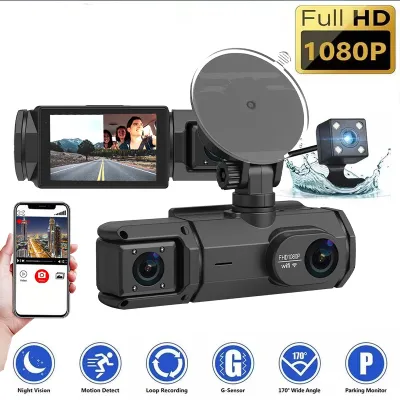

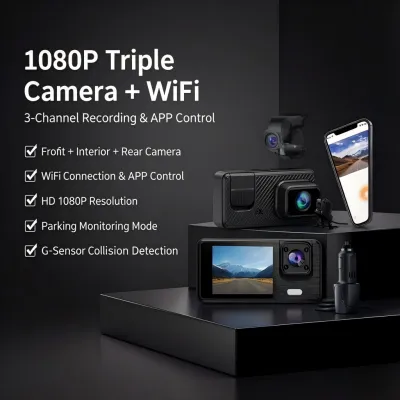
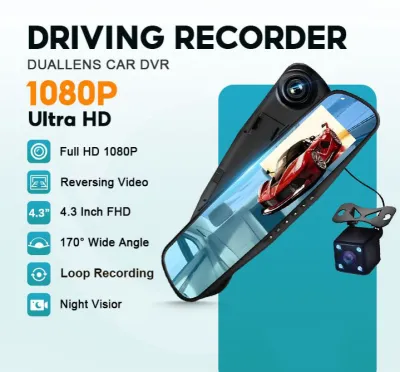
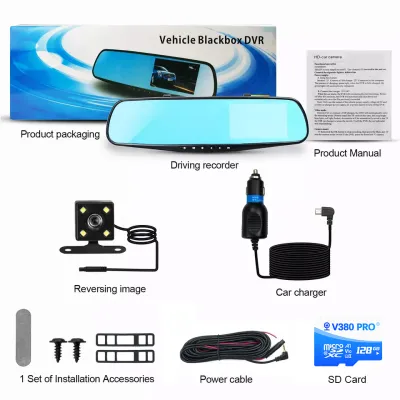
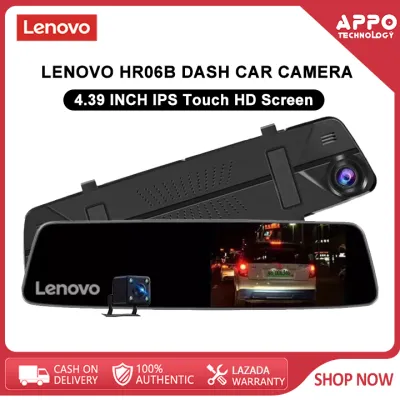
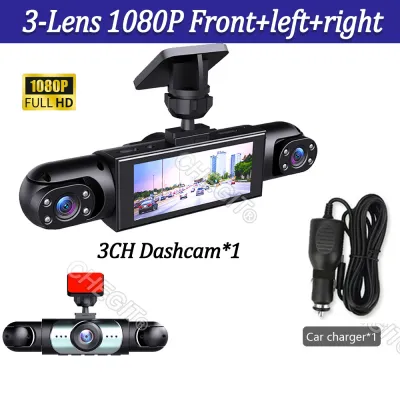
Prices are valid at publication and may change. Please refer to the product page for the latest price.
Rear-end collisions are among the most frequent traffic accidents in urban centers. Without a rear camera, proving that a tailgating driver was entirely at fault or capturing the identity of a driver who flees after a collision is incredibly difficult. Synchronized front and rear footage provides an indisputable timeline of events, showing exactly when and how an impact occurred.
Having clear documentation from both angles simplifies insurance claims and speeds up dispute resolution with local traffic authorities. Insurance providers and traffic investigators rely heavily on video evidence to determine liability. A complete dual-channel recording protects your no-claim bonus, prevents fraudulent claims, and shields you from unfair blame during road disputes.
Core Specifications to Evaluate for Complete Coverage
Video resolution and frame rate are the most critical factors for capturing legible details like license plates and street signs. For the front camera, a resolution of at least 1080p (Full HD) or 1440p (Quad HD) is recommended, while the rear camera should record at a minimum of 1080p. A frame rate of 30 frames per second (fps) is the standard baseline, ensuring smooth playback without excessive motion blur.

Field of view (FOV) dictates how much of the road ahead and behind is captured in the frame. A wide FOV between 130 and 160 degrees is ideal for covering multiple lanes of traffic and sidewalks. However, avoid excessively wide angles that exceed 170 degrees, as they can create a “fisheye” distortion that makes distant license plates appear too small and difficult to read.
Image sensors and low-light performance technologies are vital for driving safely at night or in poorly lit areas. Look for cameras equipped with Wide Dynamic Range (WDR) or High Dynamic Range (HDR) capabilities. These features balance exposure in high-contrast environments, such as exiting a dark parking basement into bright tropical sunlight, or driving under uneven street lighting.
Dual-channel recording writes two separate video streams simultaneously, which consumes memory card storage twice as fast as single-channel systems. Loop recording automatically overwrites the oldest unprotected files when the card is full, but you still need a high-capacity card to prevent important footage from being overwritten too quickly. Ensure the camera supports efficient video compression codecs to maximize storage space without sacrificing image quality.
Matching Features to Your Daily Driving Environment
In dense urban traffic, such as commuting along EDSA or C5, a wide FOV and reliable loop recording are your primary defenses against minor scrapes and lane-splitting disputes. Bumper-to-bumper congestion requires a camera that can clearly capture close-range details, even when vehicles are stopped inches apart. Quick-access event saving is also useful for manually locking footage of aggressive driving behavior.
For highway and provincial driving on expressways like NLEX, SLEX, or TPLEX, higher resolutions and stable frame rates become more important. At higher speeds, license plates pass through the camera’s field of view much faster, requiring sharp image processing to prevent motion blur. A reliable GPS logging feature is also beneficial here, as it embeds your speed and coordinates directly into the video file to verify your driving behavior.
If you frequently park on public streets or in unmonitored lots, parking mode features provide essential security. This mode monitors your vehicle while the ignition is turned off, using motion detection or impact sensors to trigger recording. To use parking mode safely, you must install a hardwire kit with an adjustable low-voltage cutoff to prevent the camera from draining your car battery.
Our tropical climate presents extreme heat and high humidity, which can severely affect electronic devices left in parked cars. Avoid dash cameras that use internal lithium-ion batteries, as they are prone to swelling, leaking, or failing under intense cabin heat. Instead, choose models powered by supercapacitors, which offer superior thermal resilience and a much longer operational lifespan in hot environments.
Installation, Routing, and Power Supply Realities
Connecting your dash camera to power involves choosing between a simple cigarette lighter adapter and a dedicated hardwire kit. A cigarette lighter adapter is DIY-friendly and easy to remove, but it leaves visible wires hanging across your dashboard and occupies your vehicle’s 12V outlet. A hardwire kit connects directly to your vehicle’s fuse box, hiding all wires behind the trim panels and enabling parking mode features.
Working with your vehicle’s electrical system carries inherent safety risks. Always consult your vehicle’s original owner’s manual to identify safe fuse slots and verify compatibility before installing a hardwire kit. If you are unfamiliar with automotive electrical work, have a qualified automotive electrician perform the installation to avoid damaging your vehicle’s wiring harness, interfering with airbag deployment, or voiding your manufacturer warranty.
Rear camera placement depends on your vehicle’s body type and your visibility preferences. Mounting the rear camera inside the rear windshield keeps it protected from rain, dust, and theft, but heavy window tint can degrade night-time video quality. Exterior mounting near the license plate provides a clear, unobstructed view but exposes the camera to road grime, rain, and potential physical damage.
Routing the connecting cable from the front windshield to the rear window requires patience and care. In sedans, the cable can easily be tucked along the headliner and door seals. For SUVs, hatchbacks, and wagons, the cable must be routed through the flexible rubber boot of the tailgate to prevent water leaks and protect the wire from being pinched when the trunk is opened or closed.
Verifying Authenticity and Warranty Before Purchase
To ensure you receive a genuine product with reliable after-sales support, purchase only from authorized distributors or official brand stores on e-commerce platforms. Counterfeit dash cameras are common in online marketplaces, often using cheaper image sensors and inferior internal components that fail under heat. Look for verified seller badges and positive customer reviews that mention long-term reliability.
Check the warranty terms carefully before finalizing your purchase, aiming for at least a 12-month local warranty. Avoid grey-market imports that require you to ship the unit back overseas for repairs or replacement. Having access to a local service center in the Philippines ensures faster turnaround times and clearer communication if you experience technical issues.
Verify the exact package contents to ensure all necessary installation accessories are included. A complete dual-channel kit should contain the front camera, rear camera, a sufficiently long rear connecting cable, mounting brackets, and the specified power adapter. Some packages may also bundle a compatible high-endurance memory card or a hardwire kit, saving you from having to purchase them separately.
Be cautious of suspiciously low prices, missing manufacturer security seals, or unofficial packaging. If a deal seems too good to be true, the product may be a counterfeit, a refurbished unit, or an older model lacking modern features. Genuine products will always feature clear branding, professional packaging, and comprehensive user manuals written in English.
Frequently Asked Questions (FAQ)
Do I need a special memory card for a front and back dash cam?
Yes, front and back dash cameras write continuous, high-bitrate video streams from two lenses simultaneously, placing immense stress on the storage medium. Standard microSD cards are not designed for this constant write cycle and will quickly fail, leading to corrupted files or missed recordings. You must use a high-endurance microSD card specifically rated for continuous video recording, with speed ratings of Class 10, U3, or V30.
For a dual-channel setup, a storage capacity of at least 128GB is highly recommended to ensure several hours of footage are retained before loop recording begins overwriting older files. Regularly formatting your memory card every few weeks using the camera’s built-in format function helps maintain card health and prevents write errors. If your camera alerts you to a card error, replace the card immediately to avoid losing critical footage.
Will a rear dash cam drain my car battery if left plugged in?
If your dash camera is plugged into a standard cigarette lighter socket that turns off with the ignition, it will not drain your car battery because power is cut when you turn off the engine. However, if your vehicle’s 12V outlet remains constantly powered, or if you use parking mode, the camera will continue to draw power while the vehicle is parked. To prevent draining your battery to the point where your engine cannot start, you must use a hardwire kit.
A proper hardwire kit features an adjustable low-voltage cutoff that monitors your car battery’s voltage. When the battery drops below a safe threshold, such as 11.8V or 12V, the kit automatically cuts power to the dash camera, preserving enough charge to start your engine. If you plan to leave your vehicle parked and unused for several weeks, it is safest to manually unplug the camera or turn off parking mode entirely.
Can I install the rear camera outside the car for a better view?
You can install the rear camera outside your vehicle only if the camera unit is explicitly rated for exterior use with a high waterproof and dust-resistance rating, such as IP67 or IP68. Exterior mounting near the license plate provides a clear, unobstructed view that is completely unaffected by dark rear window tint or a packed cargo area. This position is particularly useful for larger SUVs, vans, and pickup trucks.
However, exterior installation is more complex and requires routing the cable through the trunk lid or license plate light assembly, which must be sealed properly to prevent water leaks. If your rear camera is not waterproof, it must be mounted inside the rear windshield. If you have dark window tint, you may need to adjust the camera’s exposure settings or consider professional installation to ensure clear night-time visibility.
Community discussion
Share your experience or ask a question. Comments are reviewed before publication.