
Navigating the roads of the Philippines demands constant vigilance. From the dense, unpredictable gridlock of Metro Manila to the high-speed stretches of provincial expressways and unlit rural bypass roads, drivers face a diverse array of hazards daily. Installing a reliable botslab dash cam has transitioned from a modern convenience to an essential safeguard for legal and financial protection. However, a single model does not fit every driving habit or environment. To make an informed decision, you must analyze your specific daily routes, understand how technical specifications translate to real-world performance, and verify installation safety parameters before mounting a device in your vehicle.
Matching Botslab Features to Your Daily Philippine Driving Scenarios
Every driving environment in the Philippines presents distinct challenges that require specific dash cam capabilities. Choosing a device based solely on price or general popularity can leave you unprotected when an incident occurs.
Metro Manila Traffic and Urban Congestion In dense urban centers like Makati, Bonifacio Global City (BGC), and Quezon City, traffic moves slowly, but the risk of minor collisions, side-swipes, and parking-lot incidents is exceptionally high. Motorcycle lane filtering is a constant reality on major thoroughfares like EDSA and C5. To capture these rapid, close-quarter movements, your dash cam must feature a wide field of view (FOV)—ideally between 130 and 170 degrees. This wide angle ensures that motorcycles passing along your front fenders are recorded. Furthermore, tight public parking structures and street parking demand robust parking surveillance. This feature requires a dedicated hardwire kit to supply continuous power when the engine is off, allowing the camera to record impact-triggered or motion-activated events. Because vehicles in the city are often parked under direct sunlight in open lots, high heat resistance is vital to prevent the unit from shutting down or failing during critical monitoring hours.
Products mentioned in this guide

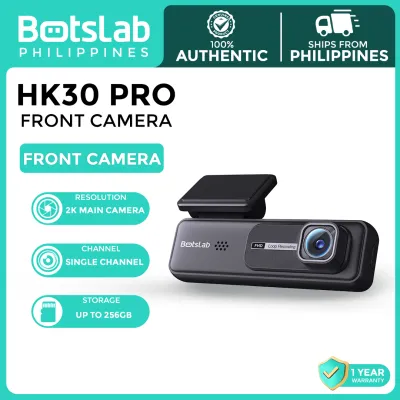
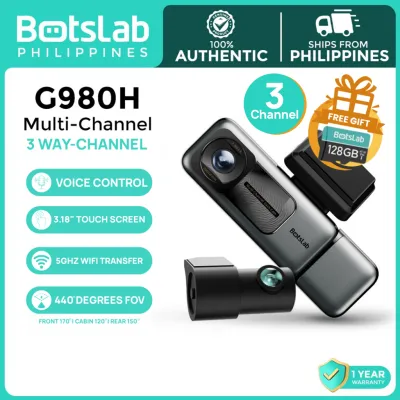

Prices are valid at publication and may change. Please refer to the product page for the latest price.
Provincial Highways and Long-Distance Travel If your daily commute or business route involves provincial highways like the North Luzon Expressway (NLEX), South Luzon Expressway (SLEX), or rural national roads, your technical requirements shift toward high-speed clarity. At speeds of 80 to 100 km/h, low-resolution cameras produce motion-blurred images, making license plates unreadable. For these routes, you should prioritize a native resolution of at least 2K (1440p) or 4K (2160p). High resolution preserves fine details even when zooming into a frame post-incident. Additionally, GPS logging is highly beneficial on long-distance routes. It embeds precise speed and geographical coordinates directly into the video file, providing indisputable evidence if you are wrongfully flagged for speeding or involved in a multi-vehicle collision. Rear-end collisions are also more common and severe on high-speed roads; therefore, selecting a dual-channel system with a high-quality rear camera is essential to document tailgating vehicles and rear-impact dynamics.
Nighttime Commuting and Poorly Lit Roads Driving after dark in the Philippines introduces significant visibility challenges. Many provincial roads, barangay streets, and even major urban avenues suffer from inadequate street lighting, missing lane markings, and sudden downpours during the monsoon season. To combat these conditions, you must examine the camera’s optical hardware. A large physical aperture—indicated by a lower f-number such as f/1.8 or f/1.5—allows more light to reach the image sensor. This optical capability must be paired with a dedicated night-vision image sensor that utilizes back-illuminated technology to enhance low-light sensitivity. Without these features, nighttime footage will suffer from excessive digital noise, and oncoming headlight glare will wash out the license plates of passing vehicles, rendering the recorded footage useless for insurance claims or legal disputes.
Essential Botslab Dash Cam Specifications to Verify Before Purchase
To ensure your chosen botslab dash cam performs reliably under demanding conditions, you must look past marketing buzzwords and verify the technical specifications listed in the product manual or official documentation.

Image Sensor and True Native Resolution When evaluating video quality, distinguish between native resolution and interpolated resolution. Some lower-tier cameras use software interpolation to upscale a 1080p sensor to a 4K output file, resulting in pixelated, blurry details when zoomed. Always check the manufacturer’s specifications for the exact image sensor model installed in the device. A true native 2K or 4K sensor captures physical pixels, ensuring that small text, distant road signs, and license plates remain sharp. Look for sensors known for high dynamic range (HDR) capabilities, which balance extreme contrasts—such as a dark tunnel exit or direct midday sunlight—to prevent overexposure.
Power Source and Heat Tolerance The tropical climate of the Philippines poses a severe challenge to windshield-mounted electronics, where cabin temperatures can exceed 60°C when parked under the sun. You must verify whether the model uses a lithium-ion battery or a supercapacitor as its internal power source. Supercapacitors do not store energy to run the camera for long periods without external power, but they are significantly more resilient to extreme heat, do not swell, and carry a much lower risk of thermal runaway or explosion. Check the product label for the certified operating temperature range. If you purchase a model with a lithium battery, you must take extra precautions, such as using sunshades, parking in shaded areas, and planning proper cabin ventilation to prevent premature device failure.
Storage Limits and Write Speeds High-resolution video files, especially dual-channel configurations recording front and rear feeds simultaneously, generate massive amounts of data. Before purchasing, verify the maximum microSD card capacity supported by the device—many modern cameras support up to 128GB or 256GB. Furthermore, standard memory cards will fail quickly under the constant write cycles of a loop-recording dash cam. You must use a high-endurance microSD card rated at least Class 10, UHS Speed Class 3 (U3), or Video Speed Class 30 (V30). Using a card with insufficient write speeds will lead to dropped frames, corrupted files, and system freeze-ups precisely when you need the recording most.
Safe Installation and Vehicle Compatibility Checks
Proper installation is critical to ensure the dash cam operates correctly without compromising your vehicle’s safety systems, electrical integrity, or manufacturer warranty.
Hardwiring for Parking Mode Safety If you plan to utilize 24-hour parking surveillance, you will need to hardwire the dash cam to your vehicle’s fuse box. This process requires a dedicated hardwire kit equipped with an adjustable low-voltage cutoff feature. This safety mechanism automatically cuts power to the dash cam if your car battery’s voltage drops below a safe threshold (such as 11.8V or 12V), ensuring you are not left with a dead battery. Before attempting this installation, consult your vehicle’s owner manual to identify safe, non-critical fuse slots (such as the accessory or dome light fuses) and avoid critical safety systems like airbags or engine management. If you are unfamiliar with automotive electrical systems, seek the assistance of a qualified auto electrician to prevent short circuits, electrical fires, or voiding your vehicle’s factory warranty.
Windshield Tint Interference High-performance window tints, particularly ceramic or metallic heat-rejection films popular in the Philippines, can interfere with the dash cam’s internal components. Metallic tints contain microscopic metal particles that can severely degrade GPS satellite reception and Wi-Fi signal transmission between the dash cam and your smartphone. Before mounting the device, check the specifications of your installed window tint. If you have a metallic tint, you may need to mount the dash cam in the “matrix” area (the dotted black section near the rearview mirror) which is often untinted, or opt for a model that supports an external GPS antenna routed to an unobstructed area of the windshield.
Rear Camera Routing and Airbag Safety Installing a dual-channel system requires routing a coaxial or USB cable from the front windshield to the rear window. You must plan this route carefully. In modern vehicles equipped with side curtain airbags, routing the cable carelessly across the pillar trim can obstruct airbag deployment or cause the cable to snap violently during an accident. Always route the cable behind the airbag mechanisms, securing it tightly to the vehicle’s frame using zip ties or adhesive clips. Additionally, when passing the cable into the rear hatch of a hatchback or SUV, always route it through the existing flexible rubber grommets to maintain a weather-tight seal. Failure to do so can allow rainwater to leak into the cabin during heavy downpours, damaging your headliner and electrical components.
Frequently Asked Questions (FAQ)
Is a rear camera necessary for driving outside Metro Manila?
While a front-facing camera is sufficient for documenting basic urban traffic disputes, a rear camera is highly recommended for driving on provincial highways and rural routes. High-speed roads carry a much higher risk of high-impact rear-end collisions, tailgating incidents, and erratic overtaking maneuvers by provincial buses or cargo trucks. A rear-facing camera provides critical context and objective evidence to prove liability in multi-car pileups or when a trailing vehicle fails to slow down in time.
Will the tropical heat damage my Botslab dash cam?
All dash cams are subject to thermal limits, and prolonged exposure to intense tropical heat can degrade internal components over time. To protect your device, verify the manufacturer’s specified storage and operating temperature limits in the manual. Avoid mounting the camera directly over windshield defroster lines, which can concentrate heat. Regularly inspect the unit for physical signs of heat stress, such as casing warping, screen bubbling, or battery swelling. If you observe any of these physical signs, stop using the device immediately and consult a professional technician.
Community discussion
Share your experience or ask a question. Comments are reviewed before publication.