
To avoid slow charging while driving through heavy traffic, you must match the specific fast charging protocol of your smartphone with the output capabilities of your car charger. A mismatch in these protocols defaults the charging speed to a crawl, regardless of the charger’s advertised wattage. Finding the right motor charger cellphone setup requires identifying your phone’s power requirements, reading the charger’s technical labels, and using a compatible cable.
Identify Your Phone's Fast Charging Protocol
Every smartphone manufacturer utilizes a specific protocol to safely negotiate high-speed power delivery. To find yours, start by checking the official specifications sheet in your device’s user manual or on the manufacturer’s official website. Some phones display the active protocol in the battery settings menu when plugged into a compatible wall adapter.
Understanding the distinction between universal and proprietary standards is crucial. Universal standards like USB Power Delivery (USB-PD) and Programmable Power Supply (PPS) are widely adopted across many modern devices. On the other hand, several brands use proprietary technologies to achieve their maximum speeds.
Products mentioned in this guide
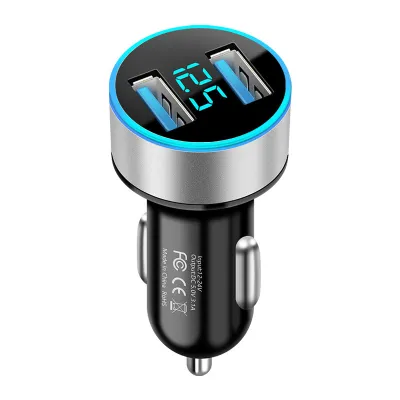
Prices are valid at publication and may change. Please refer to the product page for the latest price.
If your phone relies on a proprietary protocol, it may require a charger specifically licensed or designed to support that exact technology. If you use a generic charger, the system will typically fall back to a safe, basic charging rate. This can take hours to fill your battery during a hot afternoon drive.
Read Car Charger Labels and Output Specs
When shopping for a motor charger cellphone accessory, look closely at the technical specifications printed on the charger’s body or packaging. Manufacturers print these details in tiny text, often near the charging pins or on the back of the box. Look for explicit mentions of protocols like “PD 3.0,” “QC 3.0,” or “PPS” to confirm compatibility.

Do not rely solely on the total wattage advertised on the front of the box. A charger labeled as “95W” might actually split that power across multiple ports, such as 65W on one USB-C port and 30W on a USB-A port. If your phone requires a single 45W feed, a port capped at 18W will not deliver the fast charging speed you expect, even if the charger’s total capacity is high.
Examine the voltage and current ratings listed under the output specifications. Fast charging relies on specific combinations, such as 9V at 3A or 12V at 2.25A. Ensure the individual port you plan to use lists the exact voltage and current combination your phone needs to trigger its fast-charging mode.
Match the Charger, Cable, and Device
A fast car charger is only as good as the cable connecting it to your phone. Standard charging cables often lack the internal wire gauge or electronic markers required to handle high currents safely. To achieve true fast charging, you must use a cable rated for the specific wattage and protocol of your device.
For high-power USB-PD charging, look for USB-C to USB-C cables that explicitly support the required wattage, such as 60W or 100W. These cables contain specialized chips that communicate with both the charger and the phone to ensure safe power delivery. Using an old, thin cable from an older device will bottleneck your charging speed to standard rates.
If you plan to charge multiple devices simultaneously, check how the charger distributes power when multiple ports are occupied. Many multi-port chargers dynamically lower the output of the primary port when a second device is plugged in. Ensure the charger has independent power management chips for each port if you need to fast-charge two devices at the same time.
Safety and Vehicle Electrical Checks
Before plugging any high-power accessory into your vehicle’s 12V accessory socket, verify the socket’s fuse rating in your car’s owner manual. Most passenger vehicles use a 10-ampere or 15-ampere fuse for the auxiliary power outlet, which safely supports up to 120W or 180W of total power. Exceeding this limit by plugging in multiple high-draw devices can blow the fuse and disable your vehicle’s accessory outlets.
Look for built-in safety certifications and protective features printed on the charger’s label. Reliable chargers feature active protection against overcurrent, overvoltage, short circuits, and overheating. In tropical climates where car interiors can reach high temperatures, these thermal protection circuits are essential to prevent the charger from overheating and damaging your phone’s battery.
Ensure the physical design of the charger fits securely inside your vehicle’s socket without wobbling or obstructing nearby controls like the gear shifter or climate dials. A loose fit can cause intermittent connections, which repeatedly interrupts the fast-charging protocol negotiation and defaults your phone back to slow charging.
Frequently Asked Questions (FAQ)
Will a higher wattage car charger damage my cellphone?
No, a higher wattage charger will not damage your phone. Modern smartphones feature internal charging circuits that actively negotiate and control the amount of power they draw. The charger only supplies the maximum current and voltage that the phone requests, provided the protocols match. If you plug a 20W phone into a 100W charger, the phone will safely draw only 20W.
Why is my phone still charging slowly with a fast car charger?
Slow charging can occur due to several common bottlenecks. First, check if your cable is damaged or incompatible with fast-charging standards. Second, high cabin temperatures or direct sunlight can cause your phone to throttle its charging speed to protect the battery from overheating. Finally, some vehicles limit the power output of the 12V socket when the engine is idling or turned off.

Community discussion
Share your experience or ask a question. Comments are reviewed before publication.