
Selecting the right magnetic car charger requires a careful balance of your smartphone’s power requirements, your vehicle’s interior layout, and your daily driving conditions. While UGREEN offers a variety of magnetic charging solutions, finding the specific model that fits your needs involves looking beyond basic aesthetics. You must evaluate how the charger draws power from your vehicle, how securely it holds your device over uneven roads, and where it can be safely positioned without obstructing your view.
For drivers in the Philippines, these decisions are further influenced by local factors such as high cabin temperatures, intense tropical sunlight, and specific road safety regulations. A charger that performs well in a cool climate might struggle with thermal throttling under the heat of a Manila afternoon. By understanding the technical specifications of wireless power delivery and matching them to your phone’s capabilities, you can select a magnetic car charger that provides consistent, high-speed charging on every journey.
Decoding Power Output and Magnetic Charging Standards
To get the fastest possible charge on the go, you must first understand the difference between standard magnetic mounts and certified fast wireless chargers. Many basic magnetic mounts simply hold your phone in place while offering standard wireless charging speeds, which typically cap out at 5 watts or 7.5 watts. Fast wireless charging, on the other hand, requires a higher power threshold, often reaching 10 watts, 15 watts, or more depending on the device. When browsing UGREEN models, always check the product packaging or online specifications for official compatibility labels that indicate support for fast-charging protocols.
Products mentioned in this guide
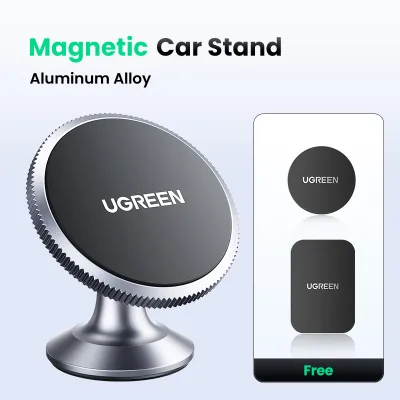
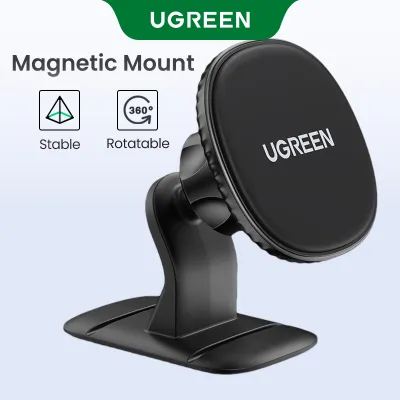
Prices are valid at publication and may change. Please refer to the product page for the latest price.
It is equally important to recognize that a charger’s maximum advertised wattage does not guarantee your phone will charge at that speed. Wireless charging is a cooperative process between the transmitter in the car mount and the receiver inside your smartphone. For example, if a magnetic charger is capable of delivering 15 watts of power, but your specific phone model limits third-party wireless charging to 7.5 watts, your device will only charge at the lower rate. Before making a purchase, verify your phone’s maximum wireless power intake by consulting the manufacturer’s official specifications.
Another critical factor that drivers often overlook is the power source feeding the magnetic charger itself. A wireless charging mount cannot generate high power on its own; it relies entirely on the car charger adapter plugged into your vehicle’s 12V accessory socket or cigarette lighter. If you connect a high-speed magnetic mount to a low-output USB port built into your car’s dashboard, the mount will be severely bottlenecked. To achieve the maximum rated output of your UGREEN magnetic charger, you must pair it with a compatible fast-charging car adapter and a high-quality, high-amperage cable.
When verifying these power components, look for adapters that support established fast-charging standards such as Quick Charge (QC) 3.0 or USB Power Delivery (PD). The product documentation for your magnetic charger will specify the minimum input voltage and amperage required to enable fast wireless charging. Ensuring that your power adapter, cable, and magnetic mount are all technically aligned prevents slow charging speeds and keeps your phone’s battery topped up even when running demanding GPS navigation apps.
Verifying Phone Compatibility and Vehicle Mount Options
Physical compatibility is the next major hurdle when choosing a magnetic car charger. Modern smartphones utilize different internal layouts for wireless charging and magnetic attachment. Devices equipped with native magnetic arrays, such as Apple’s MagSafe system, are designed to align perfectly with magnetic chargers right out of the box. If you own one of these devices, you can mount your phone directly to the charger without any additional accessories, ensuring an immediate and secure hold.

If your smartphone does not have a native magnetic array, you can still use a magnetic car charger, but you will need to take extra steps. Many Android devices and older iPhone models require either a specialized phone case with a built-in magnetic ring or an adhesive magnetic plate attached directly to the back of the phone. When using these workarounds, it is vital to position the magnetic ring precisely over the phone’s internal wireless charging coil. Misalignment not only weakens the magnetic grip but also reduces charging efficiency and generates excess heat.
Beyond phone compatibility, you must carefully evaluate how the charger mounts to your vehicle’s interior. The three most common mounting options are air vent clips, dashboard mounts, and windshield suction cups. Air vent mounts are highly popular because they keep the phone within easy reach and benefit from the air conditioning system’s cooling flow. However, you must inspect your car’s vent blades before choosing this option; thin, fragile, or highly curved blades may not support the combined weight of a heavy smartphone and a magnetic mount, especially when driving over potholes or speed bumps.
Dashboard and windshield mounts offer more flexibility in terms of positioning, but they come with their own set of considerations. In the Philippines, the Anti-Distracted Driving Act strictly regulates the placement of mobile devices within a vehicle. Any mount attached to the windshield or the top of the dashboard must not obstruct the driver’s direct line of sight or interfere with safe driving operations. When choosing a mounting style, measure your dashboard layout and select a model that allows you to position your phone legally and comfortably.
Finally, consider the impact of your phone case on both magnetic strength and charging performance. Thick protective cases, particularly those made of heavy-duty plastics, leather, or containing metal components, act as a barrier to electromagnetic induction. A case that is too thick will drastically reduce the magnetic attraction, risking a situation where your phone falls off the mount during a sudden stop. For optimal performance, use a case specifically rated as magnetic-compatible, or ensure your standard case is thin enough to allow the wireless power transfer to function efficiently.
Building Your Shortlist: Features to Compare for Daily Driving
Once you have verified the technical and physical compatibility requirements, you can begin comparing specific design features to match your daily driving habits. One of the first design elements to consider is the overall form factor of the charger. Compact, minimalist “puck” designs are ideal for drivers who prefer a clean, unobtrusive dashboard look. These models take up very little space and allow you to quickly snap your phone on and off with one hand, making them highly convenient for short, frequent trips around the city.
For drivers who rely heavily on turn-by-turn navigation, a magnetic charger with an adjustable mechanical arm or a robust ball-joint mechanism is often a better choice. These designs allow you to tilt, rotate, and extend the phone to achieve the perfect viewing angle, reducing glare from the sun and keeping the screen within your peripheral vision. When comparing these models, look for sturdy locking mechanisms that prevent the arm from sagging or vibrating while the vehicle is in motion.
Thermal management is another critical feature to evaluate, especially when driving in warm tropical climates. Wireless charging naturally generates heat as energy is transferred through the air, and this heat can cause your phone to throttle its charging speed or shut down entirely to protect its battery. To combat this, some UGREEN magnetic chargers incorporate advanced heat-dissipating materials, such as aluminum alloy casings, or feature built-in cooling vents. Choosing a model with superior thermal design ensures that your phone continues to charge efficiently even during long road trips under direct sunlight.
Additionally, think about the power needs of your passengers and other in-car electronics. If you choose a magnetic charger package that includes a cigarette lighter adapter, check if that adapter features secondary USB ports. Having an extra USB-A or USB-C port on the power plug allows you to run a dashcam or let a passenger charge their device simultaneously without needing to unplug your magnetic mount. This simple feature can greatly improve the utility of your car’s limited power outlets.
Safe Installation and Vehicle Interior Protection
Proper installation is essential to protect both your smartphone and your vehicle’s interior from damage. If you opt for an air vent mount, start by examining the structural integrity of your vent blades. Gently press on the blades to ensure they are not brittle from age or prolonged exposure to cabin heat. When attaching the mount, use the adjustable tension clip to secure it firmly without over-tightening, which could crack the plastic. If your vent blades feel flimsy, it is safer to choose a dashboard or windshield mount instead.
For dashboard mounts that utilize adhesive pads, proper surface preparation is the key to a long-lasting bond. Dashboard surfaces are often coated with dust, oils, and vinyl protectants that prevent adhesives from sticking properly. Clean the mounting area thoroughly with isopropyl alcohol and let it dry completely before applying the adhesive pad. Once applied, press down firmly for at least thirty seconds, and resist the temptation to mount your phone immediately. Most high-strength adhesives require a curing period of 24 hours to reach maximum bonding strength, especially in hot, humid environments.
Safety must always be your top priority when positioning your magnetic car charger. Never install the mount in a location that overlaps with your vehicle’s airbag deployment zones, which are typically marked on the steering wheel, passenger dashboard, and side pillars. An airbag deploys with immense force, and any object placed in its path can become a dangerous projectile. Additionally, position the mount so that it does not block your view of the road, your side mirrors, or your vehicle’s instrument cluster, ensuring you can drive safely and legally at all times.
Frequently Asked Questions (FAQ)
Will a magnetic car charger interfere with my car's key fob or sensors?
High-quality magnetic car chargers are engineered with closed-loop magnetic arrays that concentrate the magnetic force directly toward the phone’s mounting plate. This design significantly limits stray magnetic fields, meaning the charger is highly unlikely to interfere with your car’s keyless entry fob, tire pressure sensors, or dashboard electronics. However, as a general safety precaution, you should avoid placing strong magnetic accessories directly adjacent to sensitive electronic modules, such as digital compasses or keyless ignition slots. If you are concerned about a specific vehicle model, consult your vehicle owner’s manual for any warnings regarding magnetic accessories near the dashboard.
Can I use a magnetic charger with a thick protective phone case?
Using a thick protective phone case is generally not recommended for magnetic wireless charging. Most magnetic chargers require a maximum distance of 3 millimeters or less between the charger’s surface and the phone’s internal charging coil to maintain a secure grip and efficient power transfer. Thick cases, especially those made of rugged materials, wood, or leather, increase this distance and can cause the phone to slip off the mount when driving over bumps. Furthermore, cases that contain metal plates, credit card slots, or kickstands must never be used with wireless chargers, as the metal will block the electromagnetic field, causing severe heat buildup and potential damage to your device.

Community discussion
Share your experience or ask a question. Comments are reviewed before publication.